AI Tools for Invoicing 20 apps
Invoicing isn't the part anyone puts on their portfolio, but it's the part that keeps the lights on. Draft the bill, send it on time, chase the late ones, reconcile what came in, feed it to bookkeeping. Do it by hand and it swallows hours every week, opening the door to typos, forgotten follow-ups, and cash-flow surprises that could've been avoided.
AI is reshaping that grind. The best tools now read documents, draft invoices, predict who's going to pay late, and run the follow-up loop with barely any human input. They're less like a template generator and more like a finance teammate who never sleeps.
How AI helps with invoicing
Modern invoicing AI can pull line items, totals, and vendor details from PDFs, scanned receipts, and email attachments in seconds, then route them through approval and posting. Generative bits draft invoices, contracts, and proposals from a short project description. Predictive models flag accounts likely to pay late so your team can prioritize outreach. AI agents handle the slow part: sending reminders, tightening the tone as an invoice ages, logging every reply.
On the back end, the same category recognition and OCR engines keep ledgers tidy, matching transactions to open invoices without someone manually squinting at spreadsheets. The payoff is fewer touchpoints per invoice and a shorter path from bill to cash.
What to look for
Accuracy of data extraction
If your team processes a lot of invoices, extraction quality matters more than any other feature. Look for tools that handle varied formats, support multiple languages and currencies, and show confidence scores so reviewers can focus on the uncertain stuff. Good OCR and category recognition cut the manual cleanup that otherwise defeats the point of automating in the first place.
End-to-end workflow coverage
The best platforms combine drafting, sending, follow-up, and reconciliation in one place. A tool that only generates PDFs still leaves the chasing and bookkeeping to a human. Coverage of AR follow-ups, dunning sequences, and bookkeeping sync matters as much as the invoice itself.
Integrations with accounting and payment stacks
Invoicing rarely lives alone. Check native connectors for QuickBooks, Xero, Stripe, and major banks, plus APIs for custom ERP or CRM links. Smooth two-way sync prevents the duplicate-entry tax that quietly erodes any time savings from automation.
Pricing model and scale
Some tools charge per invoice processed, others per user or as a flat subscription. High-volume AP teams should model cost at realistic monthly throughput. Freelancers and small businesses often do well on free tiers that cap document volume. Match the pricing curve to your growth path, not today's volume.
Best AI tools for invoicing

Vic.ai focuses on accounts payable automation. It reads incoming invoices, matches them to purchase orders, and routes them through approval without manual keying. It's built for finance teams processing high volumes who want to shorten the bill-to-pay cycle. The platform is sold as a paid enterprise solution rather than a self-serve app.

Accordio AI turns a single project description into a proposal, contract, and matching invoice for freelancers, which removes the need to maintain separate templates. It's a free tool aimed at solo operators who want one source of truth from pitch to payment. The trade-off is depth: it's best for new engagements, not complex multi-line enterprise billing.

Inwisely specializes in accounts receivable, automating the follow-up sequences that decide whether invoices actually get paid on time. It handles invoice tracking and reminder cadence so businesses stop relying on spreadsheets to know who owes what. It's a paid product aimed at teams that want a dedicated collector rather than a general ledger.

Jinna.ai automates invoicing and payment follow-ups for small businesses, aiming to shorten cash-conversion cycles with minimal setup. It's positioned as a free tool, which makes it attractive for early-stage companies testing AI-driven billing. The focus is on simplicity and cash flow, not deep accounting integrations.

Ledger IQ blends invoice processing with expense tracking, positioning itself as an AI bookkeeper for modern businesses. It pulls invoices and receipts into a categorized ledger, reducing month-end close effort. The free tier lowers the barrier for founders who want automated bookkeeping without committing to a paid platform.

Receiptor.ai watches your inbox, extracts receipts and invoice data from emails, and categorizes expenses automatically. It fits businesses where invoices arrive as PDF attachments across many client mailboxes. Receiptor.ai is a paid tool focused on the input side of the pipeline rather than collections.

Tabs AI unifies contracts, billing, and revenue recognition into a single intelligent system, useful for SaaS and subscription businesses with complex billing schedules. By connecting contract terms to the resulting invoices, it cuts revenue leakage and audit risk. It's a paid platform built for finance teams scaling past simple per-invoice billing.

Adviseful.ai sits upstream of invoicing. It helps consultancies and agencies scope projects, then feeds the resulting specification into pricing and proposal workflows. The output makes downstream invoicing cleaner because scope, deliverables, and fees are nailed down up front. It's a paid planning tool, not a billing engine, so it pairs well with a dedicated invoicing app.

AI Software Cost Estimator turns vague project requirements into data-driven budget forecasts, giving entrepreneurs a defensible number before sending the first invoice. It cuts the awkward back-and-forth of underquoted work that leads to disputes and delayed payment. The tool is free and focused purely on the estimating step.

Automate your startup fundraising with AI (Evalyze AI) isn't an invoicing tool, but it lives in the same financial back office. It analyzes pitch decks and matches founders with investors, which shapes the capital side of the business while invoicing tools shape the revenue side. Including it here is a reminder that strong billing is part of a broader financial stack. It's offered as a free tool.

Booke AI automates bookkeeping with intelligent transaction categorization and real-time document extraction, keeping invoice data flowing into the general ledger. It shines during month-end close, when uncategorized transactions slow everyone down. Booke AI is free to start, which makes it accessible for small businesses testing AI bookkeeping alongside their existing invoicing workflow.

Inkfluence AI is the outlier in this list. It generates ebooks and audiobooks from a prompt, covers and narration included. It's not an invoicing tool and earns its place only as a content production option for freelancers who package expertise into paid digital products. Treat it as an adjacent monetization tool, not a billing system.
How to choose
Freelancers sending a handful of invoices a month should start with lightweight drafting and follow-up tools like Accordio AI or Jinna.ai, which keep setup minimal. Small businesses that need both billing and bookkeeping should pair Receiptor.ai for inbound documents with Booke AI or Ledger IQ for categorization. Finance teams handling high invoice volume are better served by enterprise platforms like Vic.ai for AP and Tabs AI for revenue ops. Consultancies benefit from scoping-first tools like Adviseful.ai and the AI Software Cost Estimator to keep estimates honest before any invoice goes out.
More AI tools to explore

Pecunio AI
Pecunio AI simplifies financial reporting by connecting to your accounting software for instant AI-powered analysis and insights.

Involve.me
Involve.me's AI-powered analytics transforms survey and form data into actionable insights with intelligent dashboards.

Mailchimp Intuit Assist
Mailchimp Intuit Assist uses AI to automate email marketing, personalize campaigns, and optimize customer engagement at scale.
Keepy AI
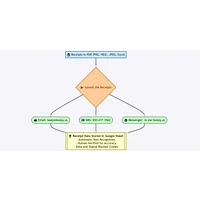
Keepy AI automates receipt data entry and storage, transforming manual processing into intelligent, email-driven automation.

Nume AI CFO
Nume AI CFO delivers instant financial insights for startups and SMEs without manual spreadsheets or reporting.

Invofox
Invofox automates document processing and data extraction from invoices, receipts, and business documents for seamless ERP integration.