


Best Clivio Alternatives 6 apps
Compare the top alternatives to Clivio — pricing, features, and ratings.
Clivio is an AI app for working with documents and information, with a workflow that can appeal to people who want these tasks in one place. If you are comparing Clivio alternatives, the reason may be a different price model, platform preference, or a need for a more specialized workflow. Some competing apps focus on collaborative writing, meeting capture, document and slide creation, file naming, legal research, or natural-language file management. The practical choice is not simply the app with the broadest promise; it is the one that matches the work you need to repeat.
Why look for a Clivio alternative?
A broad AI workspace can be useful until your main job becomes narrower. A writer may want document drafting, a team may need browser-based meeting notes, and an operations group may care more about searchable archives or natural-language file commands. An alternative can be better when it puts that central task first.
Switching also makes sense when the surrounding workflow matters more than the headline feature: where the app runs, how it handles existing files, how much usage costs, and whether its outputs fit review and record-keeping processes. Keep Clivio in consideration if it already covers those needs; compare alternatives to solve a specific gap rather than changing tools for its own sake.
What to look for in a Clivio alternative
Match the primary job
Start with the task you want to improve, not the category label. Document drafting points toward a writing or document editor, meeting capture calls for transcription and summaries, and archive cleanup calls for file organization. A clear primary job makes it easier to judge whether an alternative is genuinely better suited than Clivio.
Check inputs and outputs
Look at what you will provide and what you need back. The listed apps span simple descriptions that become documents or slides, recorded meetings that become notes, and files that are processed with AI and OCR. Confirm that the resulting format fits your review process before moving a whole workflow.
Consider platform and handoffs
Platform fit can decide whether a promising tool is useful day to day. A browser-based app may suit distributed meeting work, while a desktop workspace may be preferable for specialized document tasks; a natural-language file system may change how people retrieve and organize material. Check how the tool fits your existing handoffs, review steps, and devices rather than evaluating features in isolation.
Review cost, privacy, and records needs
Compare the stated pricing direction with your usage pattern, especially if meeting hours or document volume will grow. For sensitive material, also review access, retention, and provider-policy questions; NIST's AI Risk Management Framework offers a useful reference for organizing AI risk discussions.
The best Clivio alternatives

DocNexus is a close fit when the main reason to consider a Clivio alternative is professional document writing. It collaborates with you to produce polished documents efficiently, and its listing is marked free. Choose it for drafting-focused work rather than meeting capture, file renaming, or a specialized legal workspace.

Kolva is the most relevant option when the missing piece is meeting capture rather than document drafting. It captures, transcribes, and summarizes meetings directly in your browser; the supplied listing marks it free, while the description highlights a $0.25/hour rate, so verify which pricing detail applies to your use. Choose it if you want a meeting-centered alternative to Clivio.
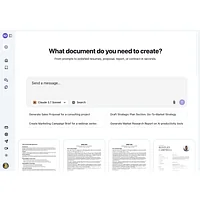
NextDocs.io is suited to people who want to turn a simple description into a professional document or slides. It is an AI-native document editor, listed as free, and may be a stronger fit than a general Clivio workflow when fast first drafts and presentation outputs are the priority. Pick it if you create both documents and slides, then compare its output and review flow with what you already use.

Renamer.ai targets a different pain point: cleaning up a large, inconsistent document collection. It uses AI and OCR to rename bulk files and transform document chaos into organized, searchable archives, and it is listed as free. Choose it over a general Clivio workflow when file naming and retrieval are the bottleneck, not collaborative drafting.

Safe Appeals is the specialist option for complex document tasks, research, and legal appeals. Its AI-native desktop workspace is listed as paid, so it may be a better fit than a general Clivio alternative when legal work and a desktop environment justify a dedicated tool. Choose it when the work is specialized, and review the paid model against your team's needs before switching.

The Drive AI is for people who want to treat files as a natural-language workspace. It lets you create, organize, and analyze documents using natural-language commands, is listed as free, and may suit users who want a command-driven alternative to Clivio. Choose it for broad document and file management, then compare how well its approach fits your existing process.
How to choose
If you mainly need professional writing, start with DocNexus; for documents and slides from simple descriptions, consider NextDocs.io; for browser-based meeting capture, Kolva; for bulk file naming and OCR, Renamer.ai; for desktop legal work, Safe Appeals; and for natural-language file management, The Drive AI. Keep Clivio if it handles your core workflow with less friction, and switch only after checking platform, privacy, review, and pricing fit.