Spreadsheets sit at the center of modern business operations, from finance and sales reporting to inventory tracking and marketing analytics. Most teams spend hours each week writing formulas, cleaning messy data, joining tables, and producing the same recurring reports. The best AI tools for spreadsheet automation now handle much of that work in seconds, turning natural language prompts into formulas, charts, and full workflows across Google Sheets and Microsoft Excel.
Modern spreadsheet AI works in three layers. Lightweight add-ons live inside your existing spreadsheet and generate formulas or rewrite text on demand. Standalone platforms ingest raw files and let you query them conversationally. Workflow tools connect spreadsheets to email, PDFs, and CRMs so that data flows in and out automatically. Choosing the right one depends on whether you need a faster formula helper, a no-code analyst, or an end-to-end pipeline.
How AI helps with spreadsheet automation
AI assistants in spreadsheets are trained on millions of public formulas, SQL queries, and Python scripts, so they can translate a plain-English request like "sum revenue by region for Q3" into a working SUMIFS or pivot table. They classify open-text fields, dedupe rows, detect outliers, and fill missing values without you writing a single expression. Several tools also generate Apps Script, Python, or SQL behind the scenes for more advanced transformations.
Beyond formulas, AI now automates the unglamorous glue work that surrounds every spreadsheet. It parses PDFs and invoices into structured rows, reconciles bank transactions, enriches leads with external data, and pushes the cleaned result into another sheet or tool. According to McKinsey's State of AI survey, more than a third of organizations already use generative AI in at least one business function, and data processing is one of the top three use cases. The result is fewer copy-paste hours and a lower error rate on the reports your team actually trusts.
What to look for
Formula and query accuracy
The core job of any spreadsheet AI is producing correct formulas the first time. Look for tools that show the generated expression so you can audit it, support the full Sheets or Excel function library, and handle nested logic like INDEX/MATCH, array formulas, and LET / LAMBDA. A good tool will also explain its reasoning so you can learn while you work, rather than blindly copy-pasting a black box.
Data ingestion and cleaning
Raw data rarely arrives clean. Strong automation tools import CSV, Excel, PDF, and JSON files, detect column types automatically, and offer one-click deduplication, normalization, and missing-value handling. If you regularly receive reports from clients or vendors in inconsistent formats, this is the single biggest time saver to evaluate.
Model choice and cost
Different AI models excel at different jobs: GPT-4 class models handle complex reasoning, Claude is strong at long documents, and Gemini integrates tightly with Google Workspace. Tools that let you pick the underlying model give you a useful trade-off between quality and per-cell cost, which matters once you start running AI over tens of thousands of rows.
Integrations and export options
Automation only pays off if the output lands where your team works. Check for native connections to Google Sheets, Excel Online, Airtable, Notion, Slack, and your CRM. API access, scheduled triggers, and webhook support are essential once you graduate from one-off formulas to recurring pipelines. For context on the broader market, see Gartner's 2025 strategic technology trends report, which highlights embedded AI as a default expectation in business software.
Best AI tools for spreadsheet automation
SheetAI
SheetAI is a Google Sheets add-on that drops AI directly into your cells through custom functions like =AI("classify", A1). It is best for users who want to generate marketing copy, categorize survey responses, or run sentiment analysis without leaving the spreadsheet. The freemium tier covers light usage, and paid plans unlock higher volume and additional model options.
AiAssistWorks - GPT Gemini Claude AI for Sheets Docs
AiAssistWorks packs GPT, Gemini, and Claude into one sidebar across Sheets, Docs, and Slides. You can switch models per task, which is useful when you want a fast cheap model for tagging and a stronger one for summarizing long text. It is a free, general-purpose option for teams already living in Google Workspace.
GPTExcel
GPTExcel is a focused formula and script generator that supports Excel, Google Sheets, and SQL. Describe what you need in plain English and it returns the formula, an explanation, and a VBA, Apps Script, or Airtable formula equivalent when relevant. The free tier handles a steady stream of one-off questions, which makes it a strong daily driver for analysts.
Rows AI
Rows AI is a modern spreadsheet platform where every cell can run an AI function. It goes beyond formula help by letting you ask natural-language questions of an entire table and getting charts, summaries, and pivot answers in return. The free plan is generous for individuals exploring conversational data analysis on top of their own datasets.
Tomat.ai
Tomat.ai targets the messy, real-world step that most teams skip: querying and cleaning raw Excel and CSV files without code. You upload a file, ask questions in English, and get filtered tables, joined datasets, and visualizations back. It is particularly strong for finance and operations users who receive vendor or client exports that never quite match.
AISheets
AISheets takes a different angle by generating entire interactive worksheets, flashcards, and mind maps from PDFs and textbooks. It is aimed more at educators and learning designers than at finance teams, but it shows how flexible the spreadsheet canvas has become once AI is in the loop. The free tier is enough to experiment with content generation from long documents.
AItable
AITable combines a visual database with a built-in Copilot trained on your own tabular data. Instead of one-off formulas, you build lightweight AI applications: a lead scorer, a ticket router, or a research assistant that always grounds its answers in your sheet. The free plan is well suited to small teams prototyping custom automations without writing code.
ChatGPT, Gemini, Mistral, Perplexity for Sheets | Pro
This DocGPT-powered add-on brings four major models into Google Sheets under one roof, with pre-built templates for content generation, lead enrichment, and SEO tasks. Switching models per column makes it easy to balance quality and cost on large datasets. It is a strong fit for growth and marketing teams running bulk enrichment directly in Sheets.
fileAI
fileAI is a workflow automation platform focused on the "before the spreadsheet" step. It ingests PDFs, emails, and forms, runs AI-driven schema enrichment and validation, and writes the cleaned, structured output to a destination sheet or warehouse. Teams that still copy data out of attachments will get the most value from its orchestration features.
GPT for Work
GPT for Work is one of the more mature paid add-ons for both Google Sheets and Microsoft Excel, with polished bulk-run interfaces, prompt templates, and reliable handling of large ranges. It is the tool to reach for when free options start hitting rate limits or you need enterprise controls like SSO and audit logs. Pricing is per seat, which makes total cost easy to forecast.
Grist
Grist is an open-source relational spreadsheet with a built-in AI generator that turns natural language prompts into fully functional tables, columns, and formulas. Because it understands relationships between tables, it can scaffold entire workflows rather than just single cells. The free self-hosted and cloud tiers make it appealing for teams that want more power than Sheets without losing the spreadsheet feel.
Keepy AI
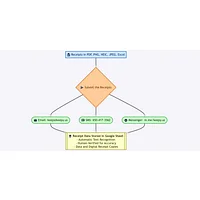
Keepy AI is a narrow but very effective tool that automates receipt and expense data entry. Forward a receipt by email and it extracts merchant, date, amount, and category, then writes the row to your connected sheet. It is a good example of purpose-built spreadsheet AI, and the free plan covers light personal or small-business use.
How to choose
If you mostly need faster formulas inside Google Sheets, start with a free add-on like SheetAI, AiAssistWorks, or GPTExcel. If your bottleneck is messy source data, pair a formula tool with a cleaner like Tomat.ai or a workflow engine like fileAI. For end-to-end automations that combine data, logic, and actions, look at Rows AI, AITable, or Grist. And if you need enterprise reliability, multi-model choice, or audit features, a paid option like GPT for Work is the safer long-term bet.
Frequently asked questions
What is the best AI tool for spreadsheet automation?
There is no single winner. For formula generation in Google Sheets, GPTExcel and SheetAI are reliable daily drivers. For end-to-end workflows, Rows AI and Grist go further by generating whole tables and dashboards. The right choice depends on whether you need help inside an existing sheet or a new platform altogether.
Can AI write Excel and Google Sheets formulas?
Yes. Modern tools generate VLOOKUP, XLOOKUP, SUMIFS, array formulas, and newer constructs like LET and LAMBDA from plain-English descriptions. GPTExcel and GPT for Work are particularly good at producing Excel-specific functions, while SheetAI and AiAssistWorks focus on the Google Sheets side.
Are AI spreadsheet tools safe to use with business data?
It depends on the vendor. Free add-ons typically send cell content to a third-party model provider, so you should review their data retention and training policies. Paid enterprise tools such as GPT for Work often offer no-retention modes, regional data residency, and SSO. Avoid pasting regulated data like health records or financial identifiers into any tool until you have read its security documentation.
How much do AI spreadsheet tools cost?
Most tools on this list offer a free tier that covers tens to a few hundred AI cells per month, which is plenty for individual experimentation. Paid plans generally range from around ten to thirty dollars per user per month for higher volume, multiple models, or team features. Workflow platforms like fileAI price by document processed rather than per seat.
Will AI replace spreadsheet work entirely?
Not yet. AI is excellent at producing first-draft formulas, cleaning routine data, and summarizing tables, but humans still need to define the question, validate the output, and design the underlying data model. The biggest productivity gains come from using AI to remove the tedious middle of the process while you keep control of the inputs and decisions.
Start with one or two of the free tools above, get a feel for where AI genuinely saves you time, and only then invest in a paid platform that fits the workflow you have already proven you want.