FlowSub is a subtitle-focused app for working with video captions and subtitles. People searching for FlowSub alternatives may want a different platform, a free option, real-time bilingual subtitles, or a broader path from idea to publishable social video. A switch can make sense when price, platform fit, or a missing step in the workflow matters more than staying with a familiar tool. This guide compares three options by use case, while leaving room for FlowSub to remain the better fit.
Why look for a FlowSub alternative?
The best reason to compare is a mismatch between the job you have and the job the current app handles well. You may need subtitles while watching online media, a complete faceless-video workflow, or help organizing creator goals instead of another subtitle-centered tool. Those are different requirements, so a competitor should be judged by the gap it closes rather than by a long feature checklist.
Budget and access matter too. A free product can be attractive for a focused task, while a paid product may be worth considering if it covers a larger publishing workflow; a browser extension may also be preferable when you want to work directly in online media. None of that makes FlowSub a poor choice: switching is useful only when the alternative better matches your platform, audience, or day-to-day process.
What to look for in FlowSub alternatives
Match the core job
First separate subtitle work from adjacent needs. If your priority is real-time translation while watching online media, a browser extension may fit; if you are trying to produce an entire social video, a generator is a different category. This prevents comparing tools on capabilities you will not use.
Check the platform and output
Consider whether you need a browser-based experience, a creation workflow for social platforms, or guidance around your broader creator goals. If YouTube is a destination, YouTube's caption guidance can help you check what your publishing process needs before you switch.
Review language and caption requirements
For subtitle use, check language pairing, timing, readability, and whether the result works with the services or media you use. The W3C WebVTT specification is a useful reference for the format and concepts behind web captions, even when a product abstracts those details away.
Compare price with scope
Free and paid labels are starting points, not complete comparisons. A free tool may be the right answer for a focused need, whereas paying for an app can make sense if it replaces several steps in a publishing workflow. Confirm current terms on the product page before switching.
The best FlowSub alternatives
GetSpiced
GetSpiced takes a different direction from FlowSub: it is an AI mentoring platform that learns your goals and preferences to boost productivity for entrepreneurs and creators. Listed as free, it suits someone whose main need is broader creator productivity rather than subtitle work. Choose it when you want support around your goals and preferences; keep FlowSub in consideration when captions and subtitles are still the core job.
GoFaceless
GoFaceless is a paid AI video generator that creates ready-to-post faceless content for YouTube, TikTok, and Reels. Compared with FlowSub, it is aimed at a broader content-production outcome rather than a subtitle-centered task. It suits creators who want faceless social content for those destinations and are comfortable considering a paid option.
SonicCaption
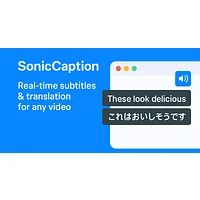
SonicCaption is a free browser extension that delivers real-time dual-language subtitles for online video and audio content. It is the closest fit here for people who want bilingual captions while consuming online media, rather than a broader creator-productivity or video-generation workflow. Choose it when browser-based, real-time subtitle access is the priority; FlowSub may still be preferable for a different subtitle workflow.
How to choose
For a free, subtitle-adjacent browser experience, start with SonicCaption; for ready-to-post faceless content on YouTube, TikTok, or Reels, consider paid GoFaceless; for AI mentoring and creator productivity, try free GetSpiced. If none of those scenarios describes your need, staying with FlowSub may be the more practical choice.
Frequently asked questions
Is there a free FlowSub alternative?
Yes. GetSpiced and SonicCaption are listed as free, but they solve different problems: GetSpiced focuses on AI mentoring and productivity, while SonicCaption provides real-time dual-language subtitles through a browser extension. Choose between them based on whether your priority is creator guidance or subtitle access.
What is the best FlowSub alternative?
There is no universal winner. SonicCaption is the most relevant choice for real-time dual-language subtitles in online video and audio, GoFaceless for ready-to-post faceless social video, and GetSpiced for AI mentoring aimed at entrepreneurs and creators. FlowSub remains worth keeping if your existing subtitle workflow is already the closest match.
Which FlowSub alternative is best for live subtitles?
SonicCaption is the clearest match among these options because its listed purpose is real-time dual-language subtitles delivered through a browser extension. It is suited to online video and audio consumption; confirm that its language pairing and browser workflow meet your needs before switching.
Can I use a FlowSub alternative for social video creation?
Yes, GoFaceless is the relevant option in this list. It is a paid AI video generator for ready-to-post faceless content on YouTube, TikTok, and Reels, so it fits production and publishing needs better than a tool chosen only for subtitles. If you only need captions, compare the scope before paying for a broader generator.
Is GetSpiced a subtitle tool?
No. GetSpiced is described as an AI mentoring platform that learns goals and preferences to boost productivity for entrepreneurs and creators. It belongs in this comparison for people whose reason for leaving FlowSub is broader creator support, not for someone specifically seeking another subtitle engine.
FlowSub can still be the right choice when its subtitle workflow matches your needs. Use the alternatives above to test the gap you actually want to close, then choose the smallest tool that fits your viewing, creation, or productivity goals.