Wallnora vs Casavista Dec AI Room Design compares two AI visual tools that sit in overlapping but distinct corners of home design. Wallnora turns text descriptions into original wall art for décor, gifts, or Etsy listings. Casavista Dec AI Room Design takes a photo of your actual room and reimagines it across 1,000+ interior styles. Both are free to try and require no design background, but they answer different questions: Wallnora helps you make new art; Casavista helps you rethink a real room.
At a glance
The split comes down to input and intent. Wallnora starts with text and outputs downloadable artwork you can print or sell. Casavista starts with a photo of your room and outputs realistic redesigns worth comparing and sharing, though it doesn't produce printable art files or commercial assets.
What each tool does
Wallnora
Wallnora is an AI wall art generator that turns a written concept into a finished piece in seconds. You pick from eight curated styles—Abstract, Watercolor, Oil Painting, Minimalist, Pop Art, Japanese Art, Photography, and Digital Art—and the tool renders the result. A wall preview mode lets you place art in a virtual room, adjust size and arrangement, and build gallery walls before committing. Once satisfied, you can download a high-resolution file for personal printing, or, on paid tiers, grab a commercial license to sell on Etsy, print-on-demand, or your own storefront. Pro members also get a free shop, which makes Wallnora a fairly complete pipeline for creators who want to monetize AI art.
Casavista Dec AI Room Design
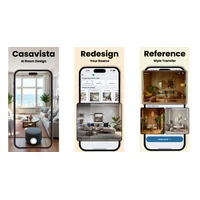
Casavista Dec AI Room Design approaches home aesthetics from the other side. Instead of generating standalone art, it takes a photo of an actual room and applies an AI redesign in a chosen style—Japandi, Coastal, Dark Academia, Cyberpunk, Ghibli-inspired, and hundreds more. Results come back in roughly 20–40 seconds, and you can save, compare, and share multiple directions side by side. A community "Help Me Choose" feature lets real users vote on your design dilemmas. Available on iOS and Android, Casavista has reportedly passed one million downloads and holds a 4.8 store rating, which suggests strong product-market fit for homeowners and renovation planners.
Feature comparison
Creation approach and input
Wallnora is text-to-image: your description plus a style choice drives the output. That gives creative freedom, but quality depends on how clearly you articulate the vision. Vague prompts tend to produce generic results. Casavista is image-to-image: you upload a photo of your real room and the AI remaps it into a new aesthetic. It's grounded in reality, but it inherits the quality and lighting of your source photo. Neither approach wins on every axis. Text-based generation is better for inventing something new; photo-based redesign is better for planning changes to a specific space.
Style variety and customization
Casavista wins on style count, offering 1,000+ aesthetics including niche and trending looks that update regularly. Wallnora offers eight curated studio styles, which is narrower but tuned specifically for wall art rather than room-scale ambiance. Wallnora lets you combine any style with any description, framing it as "infinite possibilities," but fine-grained control over details after generation is limited, a common trade-off in AI art tools. Casavista notes that accuracy varies with input image quality and that highly niche styles may not always render as expected.
Preview and visualization
Both tools treat visualization as a core feature, but they tackle it differently. Wallnora's wall preview lets you drop generated artwork onto virtual walls, switch rooms, pick frame styles, and arrange multiple pieces in a gallery layout. It's built for deciding how a piece will look before you print it. Casavista's visualization is the redesign itself: the whole room transforms, giving you a holistic sense of a new direction rather than a single art placement. If you're redecorating a whole room, Casavista's full-room rendering is more useful. If you're choosing which art print to buy or sell, Wallnora's placement preview is more precise.
Commercial use and monetization
This is where the tools diverge most. Wallnora explicitly supports commercial use: paid tiers grant a commercial license, and the Pro and Pro Plus plans are built around selling art, with sales tracking (up to 100 or 1,000+ pieces per month), product mockups, and a free Wallnora storefront. Casavista doesn't position itself as a commercial content tool. Its outputs are meant to guide real-world design decisions, not to be sold as products. If you want to monetize AI-generated imagery, Wallnora is the clear fit. For interior design planning and renovation visualization, Casavista makes more sense.
Pricing
Both apps are free to start with no credit card required. Wallnora's free tier includes three trial designs at 1,024px with a watermark and basic room preview for personal use only. Paid plans scale from Personal Lite at $4.99/month (20 creations, 2K PNG, no watermark, Gallery Wall mode) to Pro at $19/month (150 creations, commercial rights for up to 100 sales per month, free shop) and Pro Plus at $29/month (250 creations, print-ready files, unlimited sales, premium shop features). Casavista's free tier includes free AI designs after downloading the app, with a PRO tier that unlocks unlimited designs, sharper HD results, premium AI models, and an ad-free experience, though specific PRO pricing isn't disclosed on the public website. Both tools follow a freemium model where the free tier is genuinely useful for evaluation but limited for serious ongoing use.
Pros and cons
Wallnora
- Pro: Eight distinctive art styles that produce gallery-quality output
- Pro: Interactive wall preview with gallery arrangement and frame selection
- Pro: High-resolution, watermark-free downloads on paid tiers
- Pro: Commercial license and built-in shop support for sellers
- Pro: Free tier available with no credit card required
- Con: Output quality is sensitive to description clarity
- Con: Limited fine-detail control after generation
- Con: Physical print fulfillment relies on partner services
Casavista Dec AI Room Design
- Pro: 1,000+ styles including niche and trending aesthetics
- Pro: Full-room AI redesigns from a single photo in ~30 seconds
- Pro: Community voting helps resolve design indecision
- Pro: Mobile-first (iOS and Android) with 1M+ downloads and 4.8 rating
- Pro: Useful for communicating ideas with contractors and family
- Con: Rendering accuracy depends on input photo quality
- Con: No commercial-use licensing or art download for resale
- Con: Highly specific or niche design requests may not render well
Which should you pick?
Choose Wallnora if your goal is to create original artwork, whether to decorate your home with something unique or to build a side income selling AI-generated prints. Its structured pipeline from prompt to commercial-ready file, combined with the wall preview tool, makes it one of the more complete end-to-end solutions for AI art creators. The tiered pricing also means hobbyists and serious sellers can find a plan that fits.
Choose Casavista Dec AI Room Design if you're planning a real renovation or redecoration and want to see how your actual space could look before spending money. The ability to upload your own room photos, explore over a thousand styles, and compare results side by side is genuinely useful for homeowners, renters, and anyone working with contractors or family to align on a direction. Mobile availability is also a practical advantage for design inspiration on the go.
There's a narrow overlap; both let you preview art or aesthetics on virtual walls, but they're fundamentally different products. Someone redecorating their apartment might actually benefit from using both: Casavista to decide on the room's overall direction, then Wallnora to generate and purchase matching wall art to complete the look. Neither tool replaces the other in that workflow.
Other alternatives on HyperStore
If neither tool fully matches your needs, consider these other options in the directory. IC Light AI is worth exploring if you already have images and need to improve their lighting for mood boards or design presentations; it relights portrait and product photos using text prompts. For creators building a brand around an art business, MakeBrand LogoMaker uses AI to generate custom logos from a brand description, useful for setting up an Etsy shop or design portfolio. If you're creating social content around home design or art projects, Social Magic generates on-brand social media posts with AI-powered images and copy across the major platforms.
Frequently asked questions
Is Wallnora better than Casavista Dec AI Room Design for home décor?
It depends on what "home décor" means to you. Wallnora is better for generating unique art pieces to hang on your walls, especially if you want high-resolution files for printing. Casavista is better for reimagining how an entire room will look, including furniture, color scheme, and style, before committing to purchases or renovations.
Can I use either app for free?
Yes. Wallnora offers three free trial designs with no credit card required, and Casavista is free to download on iOS and Android with free AI designs included. Both apps have paid tiers that unlock higher resolution, more creations per month, and additional features.
Does Wallnora allow commercial use of generated art?
Yes, but only on paid plans. The Pro tier ($19/month) includes a commercial license covering up to 100 sales per month, while Pro Plus ($29/month) supports 1,000+ sales per month. The free tier is restricted to personal use only.
Does Casavista work on desktop, or is it mobile only?
Based on the information available, Casavista Dec AI Room Design is primarily a mobile app on iOS and Android. The website directs users to App Store and Google Play downloads rather than a web-based interface.
Which tool is better for communicating design ideas to a contractor?
Casavista is better suited here. Because it transforms photos of your actual room into realistic redesigned versions, the output is grounded in your real space and easier for contractors, family members, or designers to interpret. Wallnora generates standalone artwork rather than room-scale renderings, making it less useful as a renovation communication tool. Working effectively with design professionals often hinges on having concrete visual references, which Casavista is built to provide.
Both Wallnora and Casavista Dec AI Room Design represent the expanding role of AI in everyday creative and home design decisions. The best choice depends almost entirely on whether you want to create art or redesign a room, two related but distinct problems that these tools solve in their own right.