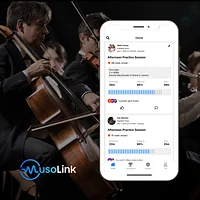
MusoLink is a practice management platform built specifically for musicians who want to turn sporadic sessions into disciplined, measurable routines. Delivered through the Octero app, it combines AI-powered instrument detection with a social feed, leaderboards, and built-in practice tools — all in a single free download. The platform targets individual players, music teachers, and ensemble groups at every skill level. If you've ever lost track of how much you actually practiced this week, MusoLink offers a data-driven answer.
What is MusoLink?
MusoLink sits at the intersection of habit-tracking, social accountability, and music education technology. Where generic productivity apps treat practice as just another timer, MusoLink's underlying Octero platform is designed around the specific rhythms of a musician's day — picking up an instrument, playing, resting, and reflecting. The product positions itself in a growing category of AI wellness and learning tools; its own website describes it as "Strava for musicians," a nod to how the fitness-tracking giant turned solo running into a social sport. With over 60,000 practices recorded according to the site, the platform has built a meaningful early user base drawn to that same community-first philosophy.
Key features
Automatic AI practice tracking
The standout capability in any MusoLink review has to be its hands-free tracking. Octero uses AI to detect when you are actively playing your instrument versus when you are resting, so there is no need to tap a timer or fill in a log after the fact. This automatic separation of playing time from idle time gives musicians genuinely accurate session data. It works across a wide range of instruments — guitars, pianos, violins, drums, and more — making it broadly accessible rather than narrowly focused on one instrument family.
Goal setting and progress visualization
Musicians can set weekly targets for both total practice time and the number of days they want to play. A practice matrix visualises consistency over time, similar in spirit to the GitHub contribution graph that developers know well. Watching that visual record build across weeks and months creates a tangible sense of momentum. The platform also tracks trends so players can spot the dips and peaks in their routines before small gaps turn into long absences.
Social accountability and community
MusoLink transforms what can be a solitary activity into a shared experience. Users can follow friends, view each other's practice sessions in real time, and send kudos after a session — small gestures that reinforce positive habits. Leaderboards add a light competitive edge for those who respond well to friendly rivalry. For educators, Angel AI Company's child-safe learning approach offers a useful parallel: structured environments with social motivation work particularly well for younger learners, and MusoLink's private group feature applies exactly this logic to music students.
One-stop practice toolkit
Beyond tracking, the app bundles a metronome, tuner, audio recorder, timer, and session notes into one interface. This matters because app-switching mid-practice breaks concentration and flow. Having every essential tool inside the same environment means a student can record a run-through, check tuning, set a tempo, and log the session without ever leaving the app. It is a practical detail that separates MusoLink from bare-bones habit trackers grafted onto music.
Pricing and plans
MusoLink operates on a freemium model. The Free tier costs nothing and provides access to all core features plus the community — a genuinely generous starting point that lets musicians evaluate the platform without a credit card. The Premium plan is priced at $5.99 per month and removes ads while unlocking all features. Schools, youth programs, and professional ensembles can enquire about a Premium Private Group plan, which is quoted individually; this tier keeps students hidden from the broader public community while preserving the leaderboards, streaks, and shared feed that drive engagement. All prices are listed in USD and taxes may apply depending on your region. Visit the official MusoLink website for the most up-to-date pricing information.
Pros and cons
MusoLink has clear strengths that make it worth considering for most practicing musicians:
That said, there are genuine limitations to weigh:
Alternatives on HyperStore
If MusoLink's community-driven model appeals to you but you're curious about other AI tools that blend social motivation with skill-building, a few listings in the HyperStore directory are worth exploring.
SocialClip Studio takes a different angle on musician visibility: it converts long-form video content into short, shareable clips. For performers who want to complement their disciplined practice routine with a stronger social media presence, it pairs naturally with what MusoLink tracks behind the scenes.
For educators looking beyond music-specific tools, Articuler focuses on networking and outreach goals, using AI to craft high-yield introductions. Music teachers running studios or freelance teaching practices may find it useful for building professional connections alongside the accountability tools MusoLink provides for their students.
If your interest extends to AI-assisted learning platforms more broadly, IngestAI offers a secure enterprise-grade approach to integrating generative AI into existing workflows — a useful point of comparison for music schools considering how AI fits into their wider educational infrastructure.
Frequently asked questions
Is MusoLink really free to use?
Yes. The Free plan gives you access to core tracking features and the full community at no cost. A paid Premium tier at $5.99 per month removes ads and unlocks every feature, but the free version is functional enough for most individual musicians starting out.
What instruments does MusoLink support?
Octero's AI is designed to work with a broad range of instruments, including guitars, pianos, violins, and drums. The company states it works with any instrument, though acoustic instruments with a clear sound profile will give the AI the clearest signal to work with.
How does the automatic practice tracking actually work?
The app uses AI to listen for the sound of you playing and distinguishes active playing time from resting time without requiring manual input. You simply pick up your instrument and play; the app handles the rest. Practice tracking research consistently shows that reducing friction in the logging process leads to more accurate data and better habit formation.
Is MusoLink suitable for music teachers and schools?
Absolutely. The Private Group plan is specifically designed for schools, youth programs, and professional ensembles. It gives administrators a dashboard to monitor who is practicing and how consistently, without relying on self-reported journals. Student data is kept private from the wider public community.
How private is my practice data?
MusoLink states that recordings are only shared with people you explicitly choose, and that data is never sold or shared with third parties. All data is described as securely encrypted. Students in a private group are only visible to other group members.
How does MusoLink compare to other AI productivity and learning tools?
Most AI productivity tools are built for general knowledge work rather than musical skill development. MusoLink is niche by design — a strength for musicians who find generic tools miss the nuances of structured practice. Our roundup of the best AI social media tools for managers shows how AI-driven accountability features are appearing across many professional disciplines, and MusoLink applies a similar philosophy specifically to the music space.
MusoLink fills a genuine gap for musicians who know they should practice more consistently but struggle to stay accountable on their own. The combination of automatic AI tracking, a social feed, and an integrated toolkit makes it one of the more complete habit-building tools available for music practice — and the free tier means there is very little reason not to try it.