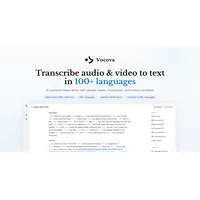
Vocova is an AI-powered transcription and translation platform that converts audio and video content into accurate text across more than 100 languages. Built by NOWGIC and available at vocova.app, the tool is designed for journalists, researchers, content creators, and professionals who need reliable, fast transcripts without manual typing. It supports direct import from over 1,000 platforms — including YouTube, TikTok, and Instagram — making it unusually versatile for a free-tier product. This Vocova review breaks down what it does well, where it has limits, and whether it belongs in your workflow.
What is Vocova?
Vocova sits at the intersection of speech recognition, translation, and content accessibility. Rather than positioning itself as a niche meeting recorder or a narrow subtitle generator, it aims to be a general-purpose media-to-text layer that works with practically any source of spoken content. Users upload a file directly — MP3, WAV, MP4, MOV, and more up to 500 MB — or paste a URL from a supported platform, and the AI generates a transcript with speaker labels and word-level timestamps within minutes. The product competes in a growing category of automatic speech recognition tools that are rapidly replacing manual transcription workflows across industries.
Key features
AI-powered transcription with speaker identification
Vocova's core engine uses state-of-the-art speech-to-text models to generate transcripts that automatically label individual speakers and attach precise word-level timestamps. This is particularly useful for multi-person interviews, panel discussions, or meeting recordings where attributing dialogue is essential. The platform also generates an AI summary of each transcript, giving users a quick overview of key takeaways without reading the full document. Real-time progress tracking lets you monitor where the job stands as it processes.
Import from 1,000+ platforms without downloading files
One of Vocova's most practical advantages is its integration breadth. Rather than forcing you to download a video before uploading it, you can paste a link from YouTube, Vimeo, TikTok, Bilibili, Instagram, Facebook, Apple Podcasts, SoundCloud, Google Drive, Dropbox, OneDrive, Loom, and hundreds more. The platform extracts the audio automatically, removing the friction of manual file handling. For content researchers or journalists monitoring multiple platforms, this alone can save meaningful time each day.
Multilingual transcription and translation
Vocova supports transcription in over 100 languages with auto language detection, so you don't need to specify the spoken language before processing begins. Once transcribed, the text can be translated into 140+ languages with a single click. A bilingual display mode shows the original and translated text side by side, and both versions are editable inline — which is a thoughtful touch for translators who want to refine the AI output rather than accept it wholesale. This makes the platform genuinely useful for international research, multilingual content production, and cross-border team collaboration.
Flexible export formats and sharing
Finished transcripts can be exported as PDF, DOCX, SRT, VTT, TXT, or CSV, covering everything from formal reports to subtitle files for video platforms. Bilingual exports — original and translated text side by side — are available in PDF and DOCX formats. Vocova also generates a shareable link for each transcript, allowing viewers to access the document without needing an account. The fact that everything runs in-browser with no software download required means it works on desktop, tablet, and mobile without setup friction.
Pricing and plans
Vocova is free to start, with no credit card required and no stated time limit on the free plan. The website references distinct Free, Plus, and Pro tiers in its FAQ section, though specific pricing figures are not publicly detailed on the main page. The free plan is described as allowing transcription without cost, which makes it a low-risk tool to evaluate before committing to a paid tier. Users with high-volume needs — such as agencies or broadcast teams transcribing hours of content daily — should check the platform directly for current plan limits and pricing, as costs could scale with usage.
Pros and cons
Vocova brings a strong feature set to a free-to-try model, but like any AI transcription tool, it has real-world limitations worth weighing before committing.
On the other side, a few friction points are worth keeping in mind:
Alternatives on HyperStore
If Vocova's transcription focus doesn't quite match your needs, Spoke.ai is worth exploring. It takes a communication-first approach to AI summarization, integrating directly with Slack, Microsoft Teams, and Gmail to surface key discussion points from ongoing team conversations — complementary to transcription if your content lives inside workplace chat tools.
For teams that work heavily with video assets and need to enhance as well as transcribe their footage, UniFab Video Enhancer offers AI-driven upscaling and noise reduction that can improve the raw audio and video quality before you run it through a transcription tool — a useful preprocessing step for degraded recordings.
Content creators who pair transcription with advertising workflows might also find value in 30characters, an AI copywriter built specifically for generating high-converting search ad headlines. Once you have a transcript of a product demo or podcast, turning key lines into ad copy becomes a natural next step. You can read more about building content workflows with AI tools in our roundup of the best AI tools for ecommerce in 2026.
Animators and video producers looking to do more with media files should also check out Viggle AI, which transforms static images into animated videos using text prompts — a different but complementary capability for creators who work across audio, text, and visual formats.
Frequently asked questions
Is Vocova really free to use?
Yes, Vocova offers a free plan that requires no credit card and has no advertised time limit. The website states you can transcribe audio and video at no cost under the free tier. Paid Plus and Pro plans exist for users who need higher volume or advanced features, but the entry point is genuinely free.
How accurate is Vocova's transcription?
The platform is built on leading speech recognition models and claims high accuracy across its supported languages. The website displays a sample accuracy of 99.2% for a demo file, though real-world results will vary depending on audio quality, speaker clarity, and accent. For clean, studio-quality recordings, accuracy tends to be high; heavily accented speech or noisy environments may require more manual editing. According to NIST research on automatic speech recognition, audio quality remains the single biggest variable in AI transcription accuracy across all platforms.
What languages does Vocova support?
Vocova transcribes audio in over 100 languages with automatic language detection, meaning you don't need to manually select the language before processing. Translation is available into 140+ languages, with a bilingual side-by-side display mode for reviewing both versions simultaneously.
What file formats and platforms does Vocova accept?
The platform accepts MP3, WAV, M4A, AAC, FLAC, OGG, OPUS, MP4, MOV, WEBM, M4V, and MKV files up to 500 MB. Beyond direct file uploads, you can paste links from over 1,000 platforms including YouTube, TikTok, Instagram, Facebook, Apple Podcasts, SoundCloud, Google Drive, Dropbox, OneDrive, and Loom.
What export formats are available?
Transcripts can be exported as PDF, DOCX, SRT, VTT, TXT, and CSV. Bilingual exports — showing original and translated text side by side — are available in PDF and DOCX. SRT and VTT files are standard subtitle formats compatible with most video platforms and editing software.
Does Vocova identify different speakers in a recording?
Yes. Vocova includes automatic speaker identification, labeling each speaker separately within the transcript and attributing dialogue with timestamps. This is editable inline, so you can rename speakers or correct any misattributions after the initial transcript is generated.
Vocova delivers a well-rounded transcription experience that punches above its weight for a free-to-start product. The combination of broad platform integrations, solid multilingual support, and flexible export options makes it a practical choice for anyone regularly converting spoken content to text — whether that's a solo podcaster, a research team, or a multilingual content operation looking to scale without adding manual labor.