


Best hi ai Alternatives 4 apps
Compare the top alternatives to hi ai — pricing, features, and ratings.
hi ai is an AI communication assistant designed to help users draft replies, summarize threads, and stay on top of inbox volume. Like most tools in the category, it pairs a language model with email context to cut down on the time spent reading and writing. Shoppers comparing hi ai alternatives usually cite pricing shifts, missing integrations, or a desire for a more specialized tool.
Why look for a hi ai alternative?
Even strong AI inbox tools can leave gaps depending on how you work. A common reason to switch is feature fit: some teams need deeper CRM or calendar hooks, while individuals want a tool that simply drafts in their voice without a heavy onboarding step. Pricing is another factor, since many assistants in this category start free or low-cost but introduce seat fees, usage caps, or premium tiers once a team grows. Platform support matters too, especially for users on less common clients or mobile-first workflows. Comparing alternatives side by side helps you match the tool to the actual friction you feel in your inbox.
What to look for in a hi ai alternative
Writing style personalization
The strongest email assistants learn how you actually write rather than producing generic drafts. Look for tools that ingest a small set of your sent emails and tune tone, length, and formality to match. This matters most for people who reply to high-stakes threads where a wrong voice reads as careless.
Automation depth
Some tools stop at drafting, while others go further by categorizing, prioritizing, or even sending routine replies on your behalf. Consider how much autonomy you want to hand over. A draft-and-review loop is safer for most professionals, while triage-only modes can suit people drowning in volume. Industry research on AI in the workplace suggests adoption rises sharply when automation removes a clear, repeated task rather than adding a new step (McKinsey, State of AI).
Integration with your existing stack
An AI assistant that does not connect to your calendar, CRM, or note system creates more friction than it removes. Check which apps each tool supports natively, and whether it works inside your email client or only through a separate dashboard. Browser extensions and mobile companions also affect day-to-day usability.
Clear pricing and data handling
Free tiers, per-seat fees, and usage-based billing all behave differently as a team grows. Equally important is how the tool handles message content, whether it trains on your data, stores it, or processes it ephemerally. Privacy posture is often the deciding factor for legal, finance, and healthcare users.
The best hi ai alternatives
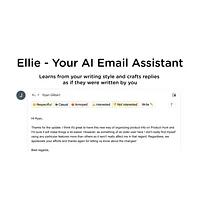
Ellie focuses on personalized reply drafting. It studies your past emails to mirror your tone and lets you specify extra context before generating each response. Compared to hi ai, Ellie leans further into voice-matching and works as a lightweight browser extension, which suits people who want help without overhauling their inbox. It is currently free to try, with paid tiers for higher volume. Best for individuals who reply to a lot of email and care about sounding like themselves.

Eloquens AI positions itself as an always-on inbox manager, prioritizing urgent messages and drafting routine replies around the clock. Where hi ai emphasizes drafting, Eloquens adds a stronger triage layer, which can appeal to users who feel buried rather than stuck. It runs as a free tool with premium features for heavier users. A good fit for freelancers, founders, and customer-facing roles where response speed matters more than long-form polish.

Notis takes a different angle entirely. It captures voice messages from messaging apps and turns them into structured notes and tasks inside Notion. While hi ai lives in the email inbox, Notis handles the audio side of communication that email tools usually ignore. It is free and integrates directly with Notion, making it easy to drop into existing workflows. Ideal for people who think out loud and prefer speaking over typing, especially those already organized around Notion.

Remy condenses multiple email newsletters into a single daily digest, attacking the subscription overload that hi ai does not directly address. Instead of helping you write replies, it reduces the time you spend reading in the first place. Remy is free and works as a set-and-forget summary in your inbox. Best for knowledge workers, researchers, and investors who subscribe widely and want signal without sifting.
How to choose
If your main pain point is writing faster replies in your own voice, start with Ellie. If you need aggressive inbox triage and round-the-clock prioritization, Eloquens AI is the closer match. Notis is the right pick when your bottleneck is voice messages rather than email. For newsletter-heavy inboxes where reading time is the real cost, Remy will save more minutes per week than any drafting assistant.