Email remains the default channel for professional communication, from cold outreach and client follow-ups to internal team updates and customer support. Most professionals spend a significant slice of their day drafting, replying to, and re-reading messages to get the tone just right. The best AI tools to write emails now handle much of that lift, generating first drafts, suggesting replies, and refining wording so you can focus on the message itself rather than the mechanics.
How AI helps with writing emails
AI email assistants plug into your inbox or browser and read the context of an incoming message before producing a tailored response. You can prompt them with a short instruction like "politely decline and reschedule," and they will compose a complete reply in your voice. Many tools also summarize long threads, extract action items, and flag urgent messages so you triage a busy inbox in minutes instead of hours.
Beyond replies, the same technology drafts new emails from a few bullet points, rewrites casual notes into polished business correspondence, and adjusts tone for different audiences — formal for clients, friendly for teammates, concise for executives. Some platforms extend to letters, proposals, and follow-ups, giving you a single workspace for almost every written business task.
What to look for
Tone and style control
An email assistant should match how you already write, not impose a generic voice. Look for tools that let you set a tone (formal, friendly, concise) and, ideally, learn from your sent messages. Style learning is what separates a useful draft from a draft that still needs heavy editing before you hit send.
Inbox integration and context awareness
The strongest tools connect to Gmail, Outlook, or your desktop client so they can read the thread, understand who is writing, and pull in relevant context like prior conversations or calendar events. Browser extensions are the most common delivery model, and a seamless inbox experience matters more than a standalone chat interface for daily use.
Privacy and data handling
Email content is sensitive. Before installing any assistant, review how the vendor stores prompts, whether messages are used to train models, and what enterprise or compliance options exist. Reputable tools clearly document their data retention policies and offer settings to opt out of training.
Language, templates, and formatting
If you write to international contacts, multilingual output is valuable. Also consider whether the tool offers templates for recurring scenarios — meeting requests, sales follow-ups, support replies — and how cleanly it handles formatting such as bullet points, signatures, and quoted replies.
Best AI tools to write emails
Politemail Pro
Politemail Pro is built specifically for tone refinement, taking casual or rough drafts and converting them into polished, professional messages. It is a good fit for non-native English speakers and anyone who worries about sounding too blunt or too stiff in business correspondence. The free tier makes it easy to test on real emails before committing.
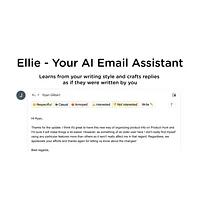
Ellie - Your AI Email Assistant
Ellie focuses on personalization by learning from your previous replies to mimic your unique writing style. You can feed it example emails and it will produce drafts that sound like you rather than a generic AI. It is especially useful for people who send a high volume of personalized replies and want to skip the blank-page problem entirely.
hi ai
hi ai is a full email client rather than a plugin, generating personalized replies powered by your choice of ChatGPT, Gemini, or DeepSeek. The model flexibility is its standout feature, letting you switch engines based on cost, speed, or quality. As a paid product, it suits professionals who want a dedicated AI-native inbox instead of bolting tools onto an existing client.
AI Letter Generator
AI Letter Generator extends beyond inbox replies into formal business letters, cover letters, and personal correspondence with customizable formatting. Multilingual support makes it a strong choice for cross-border communication and HR or consulting work where letters still matter. It is paid, reflecting its broader scope and document-style outputs.
AI Toolbar
AI Toolbar is a lightweight browser assistant that brings writing and automation helpers into any text field, including your email compose window. It is best for users who want a general productivity companion rather than an email-specific tool, with quick access to rewrites, translations, and summaries. The free model makes it a sensible starting point for casual users.
AIWritingPal
AIWritingPal is a versatile writing assistant covering more than 60 templates and 30 languages, which goes well beyond email into reports, social posts, and marketing copy. For email specifically, it offers structured templates for common scenarios like follow-ups and introductions. It is a good pick if you want one tool for both email and broader content work.
Eloquens AI
Eloquens AI acts as an always-on inbox manager that drafts routine responses and prioritizes urgent messages around the clock. Its strength is inbox triage: it surfaces what needs a human reply and handles the rest automatically. Customer support and operations teams will get the most from its 24/7 automation angle.
Gmelius Meli AI
Gmelius Meli AI is designed for Gmail-based teams, combining AI drafting with shared inbox features like sorting, assignments, and collaboration. It suits small businesses that manage customer or sales email as a group. The combination of AI drafting and inbox workflow tools makes it more than a personal assistant.
Letty
Letty is a focused email assistant that drafts, replies to, and organizes messages using contextual intelligence about each thread. It aims to keep your inbox tidy by suggesting next steps and grouping related conversations. It works well for solo professionals who want one tool that both writes and organizes.
Migma.ai
Migma.ai turns plain language prompts into branded, professional emails in seconds, with a particular focus on design and on-brand formatting. Marketing and sales teams that care about visual consistency in outbound emails will appreciate its template-driven approach. It is a strong choice when the email needs to look as good as it reads.
Paragraph AI
Paragraph AI is a general writing assistant that covers email alongside grammar checking, plagiarism detection, and content generation. It is useful for users who want to consolidate tools and improve overall writing quality, not just email speed. Students, freelancers, and content creators often gravitate to its broader feature set.
Spike AI
Spike AI combines AI message generation with thread summarization inside the Spike conversational email platform. It shines when you need to catch up on long email chains quickly, distilling dozens of replies into a few bullet points. Teams that already use Spike for team messaging will find its AI layer a natural extension.
How to choose
If you mainly want to clean up the tone of messages you have already written, start with a refinement tool like Politemail Pro. For high-volume personalized replies, Ellie or Letty fit best. Teams running on Gmail with shared inboxes should look at Gmelius Meli AI, while solo professionals who want an AI-native inbox can consider hi ai. For broader writing needs beyond email, AIWritingPal, Paragraph AI, or AI Letter Generator offer more templates and languages. Match the tool to the workflow you actually have, not the most feature-rich option on paper.
Frequently asked questions
Are AI email writers safe to use with sensitive work email?
Reputable tools encrypt data in transit and offer settings to disable model training on your messages, but you should always review the vendor's privacy policy. For highly confidential industries, look for tools that support on-device processing or enterprise data agreements.
Can AI email tools match my personal writing style?
Tools like Ellie are explicitly designed to learn from your past replies and mimic your tone. Others offer preset tone controls (formal, friendly, concise) that get you close without personalization. Expect to do light editing on the first few drafts while the model adapts.
Do AI email assistants work with Gmail and Outlook?
Most do, either as browser extensions, add-ins, or standalone clients. Gmail tends to have the deepest integrations, while Outlook support varies. Always check the specific integration list before installing, especially if your team uses a custom email domain.
Will using AI to write emails sound robotic?
Early AI drafts often did, but modern tools produce natural-sounding prose, especially when given a tone setting or trained on your style. Adding personal context — a recipient name, a reference to a prior conversation — goes a long way toward making AI drafts feel human.
How much do AI email tools cost?
Pricing ranges from free tiers with daily usage limits to paid subscriptions that unlock higher volume, premium models, and team features. The tools on HyperStore span both, so you can start with a free option and upgrade only when you hit a clear limit.
Whichever tool you pick, treat the AI as a drafting partner rather than a finished product. A short personal edit on every message keeps your voice authentic, catches the occasional hallucination, and ensures the email reflects your actual intent before you send it.