Image editing once meant learning curves measured in months and software priced for studios. Today's best AI tools for image editing collapse that gap. With a text prompt or a single click, anyone can remove a background, upscale a low-resolution photo, erase an unwanted object, or restyle an entire image. The shift is reshaping social content, e-commerce, marketing, and casual photography, because the cost of a polished visual has dropped to roughly the cost of a sentence.
This guide walks through how AI is changing the editing workflow, what to look for when picking a tool, and the strongest image editors available on HyperStore right now.
How AI helps with image editing
Traditional editors like Photoshop expose every parameter to the user. AI editors invert that relationship: the model interprets intent and handles the manipulation. Common tasks now run on autopilot, including background removal, object erasure, skin retouching, color grading, and resolution upscaling. According to Adobe's own product documentation, generative fill and similar features can extend or replace parts of an image in seconds, work that used to require careful masking and cloning.
Beyond speed, AI introduces capabilities that were effectively impossible for most users, such as training a model on a face to keep it consistent across a whole photoshoot, or restoring a torn old photograph from a single scan. The practical result is that editors spend more time choosing what they want and less time on the mechanical steps to get there.
What to look for
Quality of generative edits
Not all AI editors produce the same fidelity. Look for tools that publish sample outputs at full resolution and let you compare before-and-after pairs. Pay attention to edges around hair and fur, the consistency of skin texture after retouching, and whether upscaled images introduce plastic-looking smoothing. The National Institute of Standards and Technology has noted that image-quality evaluation still depends heavily on human perception, so side-by-side tests beat spec sheets.
Speed and batch processing
Single-image turnaround times have fallen to a few seconds for most cloud tools, but batch workflows matter for anyone editing product photos or social content in volume. Check whether the tool supports folders, APIs, or at least multiple uploads in one session.
Supported formats and resolution limits
Free tiers often cap output at 1024px or 2K. If you need print-ready 4K files, or you work with RAW and TIFF inputs, confirm those are supported before you build a workflow around a tool.
Integrations and export options
Look for direct exports to the platforms you publish on: Shopify, Etsy, Instagram, Figma, or your CMS. Browser-based editors should at least let you download PNG with transparency, while more advanced tools may offer plugin ecosystems or desktop apps.
Best AI tools for image editing
AI Image Edit.ai
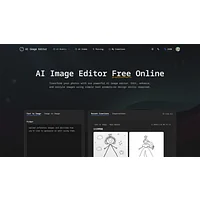
AI Image Edit.ai focuses on prompt-based transformations, letting you describe the change you want and letting the model handle the rest. It is positioned for professional results, making it a strong fit for users who already know what they want and just need a fast path to get there. Listed as free, it suits experimentation before committing to a paid workflow.
AI Image Editor.info
AI Image Editor.info is a browser-based platform that covers the everyday editing, enhancement, and transformation tasks in seconds. Because it runs in the browser, there is nothing to install, and the free tier makes it accessible for one-off jobs like cleaning up a profile photo or prepping a social post.
AI Photo Editor.ai
AI Photo Editor.ai is built on advanced AI models and targets professional-quality output for both creation and editing. It suits users who want a single tool that can generate, refine, and polish without switching between apps. The free pricing lowers the barrier for trying its model before scaling up.
ImageWithAI
ImageWithAI specializes in three high-demand jobs: upscaling, enhancement, and removal of unwanted elements. Instant results make it a practical pick for product photographers and real estate listings where the goal is to fix common flaws quickly. It is free to use and entirely online.
Adobe Photoshop
Adobe Photoshop remains the professional benchmark, and its recent generative AI features (Firefly-powered fill, expand, and restyle) extend its lead for serious work. It is the only paid option in this list and the right choice for users who need layered editing, precise masking, and a deep plugin ecosystem alongside AI assistance.
AI Enhance Image.com
AI Enhance Image.com is a free cloud tool aimed at one specific outcome: upscaling and restoring photos to 4K. It is ideal for old family photos, low-resolution downloads, or compressed web images that need a second life. No signup is required, which makes it easy to test against your hardest source file.
AI Image Editor
AI Image Editor is a free text-to-image platform that emphasizes vivid, realistic output and character consistency across generations. That consistency is useful for branding work, where the same subject needs to appear across many visuals. It doubles as an editor and a generator in one place.
AI Image to Image.io
AI Image to Image.io transforms existing photos using text prompts, handling professional edits in seconds. The no-signup approach is helpful for quick client revisions or one-off experiments. It is best used when you have a clear source image and a clear idea of the change.
AILab Tools
AILab Tools is a paid AI image editor that bundles enhancement, background removal, and portrait transformation in a single package. It suits users who want a complete suite rather than piecing together single-purpose tools. Pricing reflects the breadth of features and the higher output limits typical of paid plans.
AI Photo Editor
AI Photo Editor is a web-based tool that simplifies editing with prompt-based controls and precise image manipulation. It is a good middle ground for users who want more control than a one-click tool but do not need a full Photoshop installation. Free to use, it is worth a try before paying anywhere else.
AI Photo Editor by The Influencer AI
AI Photo Editor by The Influencer AI is built for creators who need to transform images through text prompts without learning design software. It targets social and influencer workflows where speed and consistency matter more than fine-grained control. The free tier supports quick turnaround for daily content.
editaimg.com
editaimg.com combines three of the most-requested AI features: background removal, upscaling, and intelligent object removal. The single interface keeps common fixes within reach, which is helpful for e-commerce sellers who need clean product photos across many listings. It is free and runs in the browser.
How to choose
Match the tool to the job rather than the brand. For one-click fixes like background removal and upscaling, start with ImageWithAI, editaimg.com, or AI Enhance Image.com. For prompt-driven restyling, try AI Image Edit.ai, AI Image to Image.io, or AI Photo Editor by The Influencer AI. For professional layered work and generative fill at scale, go straight to Adobe Photoshop. If you want one paid suite that covers enhancement, portraits, and backgrounds, AILab Tools is the consolidated pick.
Frequently asked questions
What is the best free AI image editor?
For most users, editaimg.com and ImageWithAI cover the highest-demand jobs (background removal, upscaling, object cleanup) without any cost or signup. If you need prompt-based restyling, AI Image Edit.ai and AI Photo Editor.ai are also free and produce strong results.
Can AI image editors replace Photoshop?
For everyday social and e-commerce work, yes. For layered design, precise masking, print production, and full creative control, Photoshop still leads. Many professionals use both: a quick AI tool for routine fixes and Photoshop for the heavy lifting.
Are AI-edited images safe to use commercially?
It depends on the tool's training data and licensing terms. Adobe's Firefly-based tools, for example, are trained on licensed or public-domain content, which makes commercial use straightforward. Always check each tool's terms of service before using outputs in paid campaigns or product listings.
How is AI image editing different from AI image generation?
Generators create images from text alone. Editors start with an existing photo and modify it. Some tools, like AI Image Editor, do both, which is useful when you need a consistent subject across many visuals.
Do AI image editors work on phones?
Most modern AI editors are web-based and responsive, so they work on phone browsers without an app. A few also offer dedicated mobile apps. Performance depends on your connection, since processing happens in the cloud.
Pick one tool from the list, run a real test on your hardest image, and decide based on the result. The fastest way to find the right AI image editor is to see your own output, not to read another comparison.