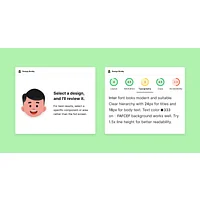
Design Buddy is an AI-powered design reviewer built for people who create designs without a formal design background. Available as a plugin or add-on for Figma, Canva, and Adobe Express, it analyzes your work across multiple dimensions—layout, typography, color harmony, contrast, and accessibility—and returns specific, actionable feedback before your design reaches a client or stakeholder. It's aimed squarely at marketing teams, product managers, startup founders, and anyone who "ended up doing design" as part of their job. If you've ever shipped something and cringed at the feedback session afterward, this tool is designed to prevent exactly that.
What is Design Buddy?
Design Buddy sits in a growing category of AI design assistants that function as an automated pre-flight checker for visual work. Unlike general-purpose AI tools that offer surface-level suggestions, Design Buddy evaluates designs the way a trained designer would—scoring individual elements like spacing consistency, visual hierarchy, and contrast ratios against established design principles and accessibility standards. The product is created by mighty.tools and positions itself as a practical confidence booster for non-designers who need professional-quality feedback without access to a full design team.
Key features
Multi-dimensional design scoring
Rather than offering a single pass/fail verdict, Design Buddy assigns individual scores to distinct design categories: layout structure, typography choices, color harmony, contrast ratios, accessibility compliance, visual hierarchy, and spacing consistency. This granular breakdown makes it immediately clear where a design is strong and where it needs attention. Designers—or non-designers—can prioritize their revisions intelligently rather than guessing at what feels off.
Actionable, specific feedback
One of the most common frustrations with automated design tools is vague output ("this could be improved"). Design Buddy sidesteps this by tying each scored element to concrete recommendations grounded in design best practices and UX principles. The workflow is intentionally simple: select your design, click "Review this design," and act on the feedback. You can then re-review after making changes and watch scores improve—a tight iteration loop that builds both skill and confidence over time.
Accessibility and contrast evaluation
Design Buddy places notable emphasis on inclusive design. Its contrast evaluation checks whether text and UI elements meet readability thresholds for users with visual impairments, aligning with widely recognized accessibility guidelines like WCAG. Hierarchy analysis confirms that information is communicated in the intended priority order—a detail that's easy to overlook under deadline pressure but critical for usability. For teams working on public-facing products, this alone can save significant remediation effort.
Cross-platform integration
Design Buddy works directly inside the tools its target audience already uses. Figma and Adobe Express users install it as a plugin or add-on and activate it with an API key; Canva users who subscribe through the Canva marketplace get it activated automatically. A single subscription covers all three platforms, so users aren't locked into one environment. This flexibility makes it practical for teams that work across multiple design surfaces, from UI mockups to social media graphics.
Pricing and plans
Design Buddy offers one paid plan with unlimited reviews, billed at $12 per month (or less on an annual plan, which saves 30%). New users get a 7-day free trial with no charge until day eight, and cancellation is available at any time through the customer portal. There are no refunds after the trial period, so the free trial window is the right time to thoroughly evaluate the tool. Users on older grandfathered plans with a fixed monthly review quota continue on those terms without changes.
Pros and cons
Design Buddy covers a broad set of design dimensions in a single workflow, making it genuinely useful for non-designers who lack the vocabulary or experience to self-critique effectively.
That said, there are real limitations worth weighing before committing, particularly for more experienced or brand-sensitive design teams.
Alternatives on HyperStore
Filtrix AI takes a different angle on design assistance—rather than reviewing your work, it transforms photos into stylized artwork using AI-powered filters. If your design output skews toward creative imagery and social content rather than structured UI, Filtrix AI is worth a look as a complementary creative tool.
For teams producing short-form video content alongside their design work, SocialClip Studio automates the creation of engaging video clips from longer recordings. It's particularly relevant for marketing teams who handle both visual design and social media content production.
Meshy is a strong option for designers working in 3D contexts, converting text prompts and images into production-ready 3D models with AI-assisted texturing. It won't replace a layout reviewer, but it fills a gap for product designers and game developers who need rapid 3D asset generation.
Teams building interfaces and looking to validate them beyond visual design may find Momentic valuable. Momentic is an AI-powered test automation platform that verifies how designs actually behave in production, extending quality assurance beyond aesthetics into functional correctness.
Frequently asked questions
Who is Design Buddy built for?
Design Buddy is explicitly built for non-designers: marketing professionals, product managers, startup founders, and small business owners who create visual content without formal design training. It also offers value to junior designers and even seniors working under tight deadlines, where a second set of eyes—even an artificial one—can catch overlooked mistakes.
Which design tools does Design Buddy support?
Design Buddy integrates with Figma, Canva, and Adobe Express. It functions as a plugin in Figma and Adobe Express, and as an add-on inside Canva. One API key activates the tool across all three platforms, so you don't need separate subscriptions for each environment.
Is there a free version or trial?
Design Buddy does not have a permanently free plan, but it offers a 7-day free trial on its paid plan. You won't be charged until day eight, and you can cancel at any time before that. There is no refund policy once you're past the trial, so use the trial period to run a meaningful volume of reviews.
How does Design Buddy handle accessibility checks?
The tool evaluates contrast ratios to ensure text and UI elements meet readability standards for users with visual impairments, drawing on principles consistent with WCAG guidelines. It also assesses visual hierarchy to confirm that design elements communicate information in the intended order. These checks are built into every review automatically—you don't need to run a separate accessibility audit.
Can Design Buddy replace a human designer?
No, and the tool doesn't claim to. Design Buddy is designed to complement human judgment, not replace it. It can catch technical and structural issues—contrast failures, inconsistent spacing, weak hierarchy—but brand-specific decisions, creative direction, and final approval still require human expertise. Think of it as a pre-flight checklist, not an autopilot.
How does the review process work in practice?
The workflow is straightforward: open your design in Figma, Canva, or Adobe Express, select the elements you want reviewed, and click "Review this design." Design Buddy returns scored feedback with specific recommendations for each category. You make the suggested changes and can re-submit for another review immediately, since current plans offer unlimited reviews. If you're newer to design thinking, pairing this with resources like our Prompt Engineering Guide for Beginners can help you better interpret and act on AI-generated feedback across tools.