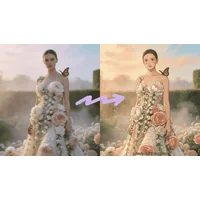
Photo editing used to mean mastering layers, masks, and adjustment brushes in software like Photoshop. Today, the best AI tools to edit photos let you describe a change in plain English and watch the image transform in seconds. From quick retouching and background removal to full style transfers and 4K upscaling, AI photo editors handle work that once took hours, opening professional-quality editing to anyone with a browser and an idea.
How AI helps with photo editing
Modern AI photo editors accept two kinds of input: an image and either a text prompt, a reference photo, or a one-click action. Under the hood, generative and diffusion models identify objects, faces, lighting, and composition, then rebuild pixels to match the requested outcome. The practical result is that tasks like removing a background, changing a season in a landscape, swapping a frown for a smile, or cleaning up skin blemishes become single-click operations.
For working photographers, marketers, and casual creators, this collapses the editing pipeline. A batch of product shots can get consistent lighting and clean backgrounds in minutes. A travel photo can be de-noised, sharpened, and upscaled for print without opening a desktop app. According to Adobe's overview of generative photo tools, this kind of prompt-based editing is now a core feature across the industry, not a niche experiment.
What to look for
Output quality and resolution
Resolution determines whether your edited image is usable. Look for tools that export at full original resolution or higher, especially if you plan to print or post to high-density displays. Many AI editors cap free exports at 1024px or 2048px, which is fine for social but limiting for commercial work. Check whether the tool supports 4K upscaling and whether it preserves fine detail like hair, text, and skin texture rather than smoothing everything into a plastic look.
Editing control and prompt accuracy
Not every tool interprets prompts the same way. Some lean toward generative reinterpretation, where the output drifts from the original. Others stay faithful to composition and only modify what you ask for. If you need precise edits (remove this object, change this color, fix this lighting), favor tools that offer mask-based or region-based controls alongside free-form prompting. If you want creative restyling, a more generative model is a better fit.
Supported formats and workflows
The best AI tools to edit photos fit into how you already work. Web-based editors are fastest to try, while mobile or desktop apps win for batch processing and offline use. Check the file formats supported on input (JPG, PNG, RAW, HEIC) and output (PNG with transparency, TIFF for print, JPG for web). Integrations with cloud storage, e-commerce platforms, or design tools like Figma can save significant time on repetitive tasks.
Pricing and usage limits
Most AI photo editors offer a free tier with daily or monthly credits, then charge per image or via subscription above that. Read the fine print on commercial use rights, watermark policies, and whether generations are private. For business and brand work, commercial licensing is non-negotiable, and the difference between a free and a paid tier often comes down to exactly that.
Best AI tools to edit photos
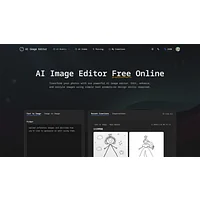
AI Photo Editor
AI Photo Editor is a web-based tool focused on prompt-based edits and precise image manipulation. You upload a photo, describe the change, and the model rebuilds the relevant regions while keeping the rest intact. It suits users who want quick retouching without learning a layered editor.
AI Photo Editor.ai
AI Photo Editor.ai combines image creation and editing in one interface, running on advanced generative models. It handles retouching, object removal, and stylistic transformations with a focus on professional-quality output. The free tier makes it accessible for trying out larger edits before committing to a workflow.
AI Photo Editor by The Influencer AI
AI Photo Editor by The Influencer AI is built for content creators who need on-brand images fast. You describe what you want in text and the tool produces edited photos without requiring manual masking or design skills. It is a strong fit for social media managers and influencer workflows.
EditAI - AI Photo Editor
EditAI bundles several common editing tasks into a single interface: instant background removal, 4K upscaling, and more than 500 filters. It runs on mobile, web, and desktop, so the same tool works across devices. This makes it a versatile option for users who want an all-in-one editor rather than a stack of single-purpose apps.
Luckiss AI
Luckiss AI Image Editor is a paid, no-sign-up tool that turns text prompts into edited images. The friction-free entry point is useful when you want to test a prompt or produce a quick edit without creating an account. It is geared toward users willing to pay for fast, prompt-driven results.
Reshot AI
Reshot AI specializes in facial and portrait edits. It can adjust expressions, refine pose, rebalance lighting, and rework backgrounds in a single pass. Photographers retouching headshots, corporate portraits, or dating profile photos will find its focused feature set useful.
AI Image Edit.ai
AI Image Edit.ai accepts text prompts and returns precisely edited images. The interface is minimal, which keeps the focus on the prompt itself rather than dozens of sliders. It is a good fit when you want to iterate quickly on a specific edit idea.
AI Image Editor.info
AI Image Editor.info is an online platform that edits, enhances, and transforms digital images in seconds. Its generalist approach covers common tasks like color correction, object cleanup, and style changes. The browser-based experience means there is nothing to install.
Editly
Editly handles three jobs in one place: generating new images, enhancing existing photos, and restoring damaged or low-quality ones. It accepts both text prompts and reference images, giving you more ways to steer the output. The restoration angle is particularly handy for old family photos or compressed web images.
Image to ImageAI
Image to Image AI focuses on style transfer, restoration, and general editing at professional quality. You supply an image and the model produces a reworked version in the style or direction you specify. It is designed to be approachable even for users without technical editing backgrounds.
Img2Img AI
Img2Img AI turns source photos into polished edits, full restyles, or extended (outpainted) compositions. The no-design-skills-required positioning makes it accessible, while the prompt-based control still gives creative range. It works well when you want to push a photo into a new aesthetic rather than just retouch it.
PicTools AI Image Generator & Photo Editor
PicTools combines an image generator and a photo editor under one roof. You can start from a prompt to create an image or upload an existing photo to edit it, with instant results aimed at professional use. The hybrid positioning is useful for content pipelines that mix generated and real photography.
How to choose
For everyday retouching and background removal, a generalist tool like EditAI or AI Image Editor.info covers the basics across devices. For portrait and headshot work, Reshot AI is purpose-built for faces. If you want creative restyling and are comfortable with prompt-driven results, Img2Img AI and Image to ImageAI give you more artistic range. For commercial creators who need a fast, account-free experience, Luckiss AI is worth the paid tier. Match the tool to the task, not the other way around.
Frequently asked questions
What is the best AI tool to edit photos for free?
Several of the tools above, including AI Photo Editor, AI Photo Editor.ai, and EditAI, offer free tiers that cover common tasks like retouching, background removal, and prompt-based edits. For occasional personal use, these free plans are usually enough. Heavy or commercial users will hit credit limits and benefit from a paid upgrade.
Can AI photo editors replace Photoshop?
For most everyday edits, yes. AI editors handle retouching, background removal, upscaling, and color adjustments that previously required Photoshop expertise. For highly technical compositing, layer-based design, or print production work, a traditional editor still offers more granular control. Many professionals now use AI tools for the first 80 percent and a traditional editor for finishing touches.
Are AI-edited photos safe to use commercially?
It depends on the tool's licensing terms. Some free tiers restrict commercial use, watermark outputs, or claim rights over generations. Paid tiers from established tools typically grant full commercial rights. Always check the specific license before using AI-edited images in ads, products, or branded content.
How do prompt-based photo editors work?
You upload an image and write a description of the change you want, such as "remove the person on the left" or "change the lighting to golden hour." A generative model identifies the relevant parts of the image, rebuilds those pixels, and returns a new version. The model is trained on large datasets of images and their captions, which is why clearer prompts tend to produce better results.
What resolution can AI photo editors export?
It varies by tool. Many free tiers cap output at 1024px or 2048px, which works for social media and most web use. Tools that advertise 4K upscaling, like EditAI, can produce higher-resolution outputs suitable for print. Check the export settings before committing to a tool for a specific project.
Try one or two of these editors with a real photo you would normally spend ten minutes tweaking. You will quickly get a feel for which tool matches your editing style, output needs, and budget, and you can build a small personal stack rather than relying on a single app for everything.